
News 


MarkdownPad 2.3 Released
New Markdown processor: GitHub Flavored Markdown (Offline)
I’m happy to announce that MarkdownPad 2.3 includes support for an offline version of GitHub Flavored Markdown, so you no longer need an active network connection or have to log into your GitHub account to use GitHub Flavored Markdown. While the offline GFM processor doesn’t offer quite as many features as the online processor (like emoji and task lists), it’s a great alternative for creating GFM-compatible documents offline.
Quick Markdown selector
In addition to the new Markdown processor, a lot of effort has been put into simplifying and improving the usage of other existing Markdown processors. You can now quickly change Markdown processors without opening the Options window by using the “Quick Markdown Selector” button in the status bar, making it easier than ever to quickly change processors while editing a document.
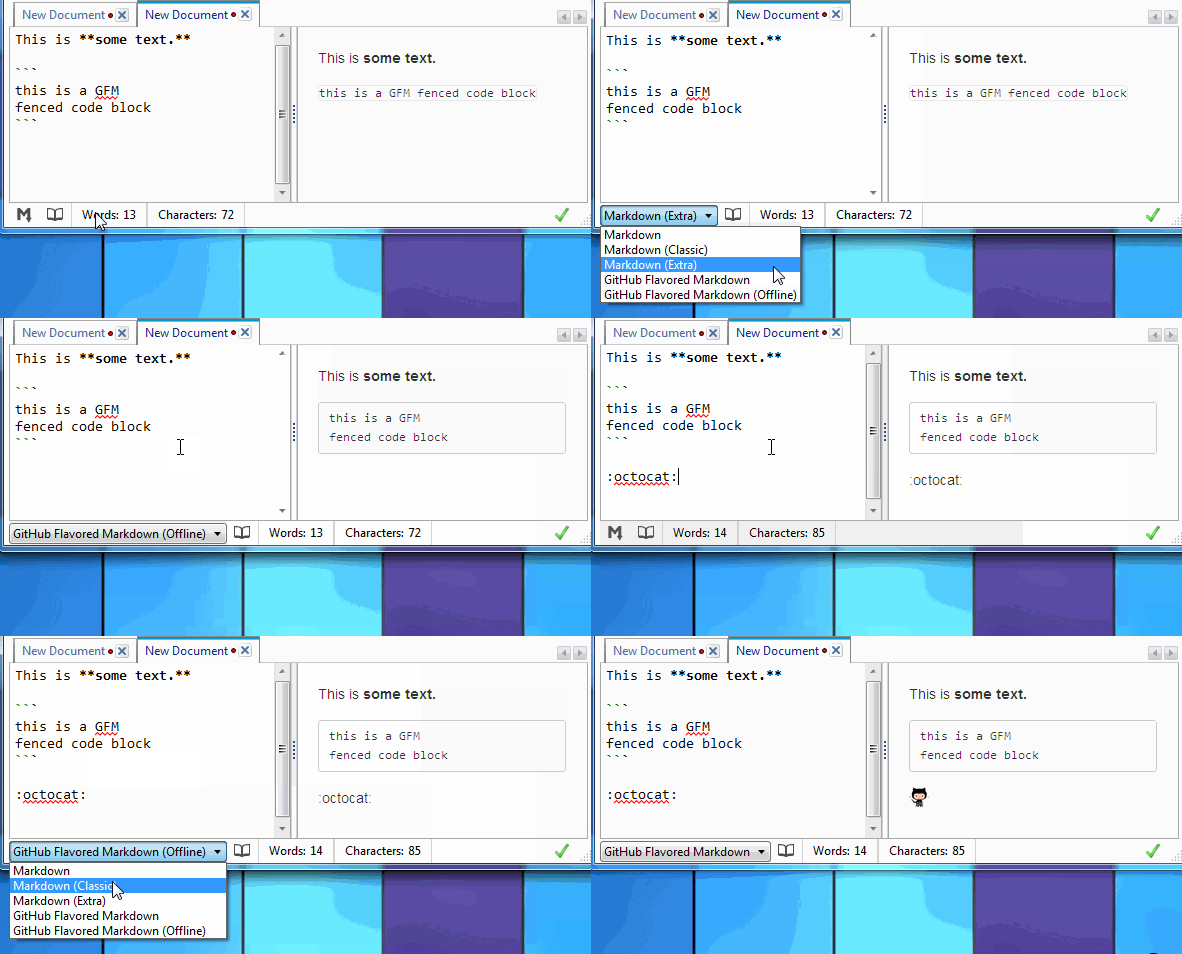
Existing Markdown processors have also been simplified for easier use:
- Markdown: The default Markdown processor in MarkdownPad 2. This processor follows the original Markdown specification.
- Markdown (Classic): The default Markdown processor from MarkdownPad 1. This also follows the original Markdown specification, but offers a few additional features.
- Markdown (Extra): Includes additional improvements on top of the original Markdown specification, including tables, fenced code blocks, and footnotes.
- GitHub Flavored Markdown: Includes additional improvements on top of the original Markdown specification, including tables, fenced code blocks, emoji, code syntax highlighting, and task lists.
- GitHub Flavored Markdown (Offline): An offline version of the GitHub Flavored Markdown processor, without emoji and task lists.
Note: Because of these improvements, you may find that your currently selected Markdown processor was reset to “Markdown” after updating to MarkdownPad 2.3. After the update, this will not happen again.
Full Change Log
-
New Markdown processor: GitHub Flavored Markdown (offline)
-
Added: Quick Markdown Selector in the status bar
-
Added: Re-open the “Welcome to MarkdownPad” document displayed on application’s first run by going to Help → Documentation → Open Welcome Document
-
Improved: Updated markdownpad-github.css to support GitHub’s keyboard symbol HTML tag
<kbd>. Use the Restore Defaults button in the Stylesheet options page to get the newest version of this stylesheet. -
Improved: Simplified selection and usage of Markdown processors
-
Improved: View description of Markdown processor features by hovering mouse over processor name
-
Improved: GitHub Flavored Markdown error handling
-
Improved: Bug reporter includes additional helpful error information
-
Improved: Text layout in Options window for translations and window resizing
-
Fixed: When dragging and dropping an image into the MarkdownPad editor pane, opens the Insert Image dialog
-
Fixed: Navigating to internal links no longer opens them externally
-
Updated: All translations
-
Updated: Translator acknowledgments and licenses
I’d also like to send my thanks once again to all of the contributors that have provided translations to the MarkdownPad Translation Project:
Chinese (PRC, zh-CN)
- Wu Qingyuan
- Hu Junqing
- Lin Beck
- Yong Sam
- Liang Honghao
- Sun Zhidong
- Benny F
- Daniel Z
- Ming Zhu
- He Lan
German (Germany, de-DE)
- Oliver Salzburg
- David Bimmler
- John AC Lupe
- Andreas Linnert
- Lukas Schulze
Polish (Poland, pl-PL)
- Michał Dziubek
- Slawomir Koszewski
Portuguese (Portugal, pt-PT)
Russian (Russia, ru-RU)
- Paul Klyuchnikov
- Vitaly Kuzmin
Finnish (Finland, fi-FI)
Italian (Italy, it-IT)
- Jacopo Scarponi
- Claudio Bartoli
- Michele Locati
- Stefano Paparesta
French (France, fr-FR)
- Hugo Dahl
- Jean-Michel MEYER
- David Brabant
- Clément Bourgeois
- Basile Cornet
- Christian Mattart
- Olivier Piasentin
- Laurent Souchet
- David Hannibal
Japanese (Japan, ja-JP)
- Yoshiaki Tanaka
- Haruo Nakayama
- Yasufumi Kobayashi
- Yoshinori Kuninaka
Korean (Korea, ko-KR)
- Hanjo Kim
- Dae-yeop Lee
Danish (Denmark, da-DK)
Hungarian (Hungary, hu-HU)
- Egyed Serf
MarkdownPad 2.2.1 Released
Change Log
-
Improved: More descriptive error messages and better error handling for GitHub Flavored Markdown issues.
-
Fixed: Minor Markdown syntax highlighting issue when using hyperlink syntax in Markdown Extra style footnotes.
MarkdownPad 2.2.0 now speaks Danish
New Translation
I’m happy to announce that MarkdownPad now supports Danish (da-DK). Thank you to Mikael Lyngvig for providing the translations!
Change Log
-
Added: Selected character count in status bar (visible when text is selected).
-
Added: Splash screen while MarkdownPad is loading. This can be disabled under Tools → Options → Advanced tab.
-
Added: PDF Export features: Customizable margins, orientation, and paper size under Tools → Options → File tab.
-
Added:
Open File in New Windowfeature to right-click context menu of document tabs. When used, will open the current document in a new instance of MarkdownPad. Useful for keeping two documents side-by-side. -
Improved: If an error occurs while processing GitHub Flavored Markdown, the error message will be displayed in the LivePreview pane rather than via a message box.
-
Improved: In Options window, if clickable hyperlinks are disabled, the hyperlink color picker is also disabled.
-
Modified: Moved spell check options icon to leftmost area of status bar.
-
Translations: Added Danish (da-DK).
-
Translations: Updated all translations.
-
Fixed: Missing strings in some translations.
Bonus: More descriptive version numbers
Starting with this release, MarkdownPad’s version numbers will now tell you more about the new version.
- The first number is the major version number, which will always be 2.
- The second number will be incremented when new features are added to MarkdownPad.
- The third number will be incremented when the update only contains minor changes or fixes.
- The fourth number (visible in the About menu) remains a unique build identifier.
MarkdownPad 2.1.20 Released
- Fixed: Minor Markdown syntax highlighting issue with inline and reference-style hyperlinks
MarkdownPad 2.1.19 Released
-
Added: Option to reload the current file from its source on disk under the
Filemenu -
Added: Character count to status bar
-
Added: Selected word count and selected character count (only visible when text is selected)
-
Added: (Experimental) Option to automatically include a Markdown document in HTML output. This document will not be visible in the Editor pane, but it will be automatically included in the output HTML version of your document. This allows users to create a “reference” Markdown file full of reference-style hyperlinks that can be accessed across all documents in MarkdownPad.
-
Improved: Button size in the Unlock Pro window for some locales
-
Improved: Visual improvements to the Options window
-
Improved: The spell check button in status bar is now dimmed when disabled, rather than shown with a red X
-
Fixed: Many fixes to Markdown syntax highlighting in the Editor pane, including strong, emphasis, inline code blocks and hyperlinks
-
Fixed: The
Save Allcommand will now only save files that have changes -
Fixed: Issue with text size in Options window tabs with high DPI settings
-
Updated Translations: Updated translations for German, French, Italian, Japanese, Korean, Portuguese, and Chinese
-
Minor additional fixes and improvements
Many new additional features are in development for future releases. Thank you for all the tweets, emails, bug reports, forum posts, and general feedback. Keep them coming!
MarkdownPad 2.1.18 Released
- Added: Option to disable internet connection verification under
Tools→Options→Advancedtab.
MarkdownPad 2.1.17 Released
-
Added: “Copy File Path” option added to right-click menu of tabs. Using this option will copy the full path of the file to the clipboard.
-
Fixed: File modified by external program notification was too sensitive on some operating systems
MarkdownPad 2.1.16 Released
-
Improved: Search box text components are now available for translation
-
Fixed: Search box not visible
MarkdownPad 2.1.15 now speaks Japanese and French!
With the release of MarkdownPad 2.1.15, I’m very happy to announce that MarkdownPad now supports Japanese (ja-JP) and French (fr-FR), which brings the total number of supported languages to 10! My sincere thanks to all of the users that have helped with these translations.
This update also brings many new improvements and fixes, which are explained in detail below.
Full Changelog
-
Added Translations: Japanese (ja-JP), French (fr-FR)
-
Updated Translations: Korean, German (Germany), Italian, Portuguese (Portugal), Russian (Russia), Polish, Chinese (PRC)
-
Added: Notification and option to reload file if it was modified or deleted outside of MarkdownPad. This feature can be disabled under
Tools→Options→Filetab →Monitor if open documents are modified or deleted on disk. -
Added: Option to automatically reload file if modified outside of MarkdownPad
-
Added: Option to view formatting marks in the Editor pane
-
Added: Option to customize the hyperlink color in the Editor pane
-
Added: Ability to open multiple new instances of MarkdownPad under
File→New Window -
Added: Option to disable automatic continuation of lists
-
Added: Keyboard shortcuts for Export HTML (
Ctrl+Shift+1) and Export PDF (Ctrl+Shift+2) -
Improved: Spell check settings are now in the status bar for easier access - you no longer need to go to Options to change spell check language
-
Improved: Spell check is disabled by default if the user’s system language isn’t available as a spell check dictionary
-
Improved: Several user interface and organizational improvements to the Options window
-
Improved: GitHub Flavored Markdown: If no network connection, displays message in LivePreview pane rather than display error dialogs
-
Improved: Startup speed on some systems
-
Fixed:
HomeandEndkeys now work as expected in the Editor pane -
Fixed: Keyboard shortcut conflict between Save As and Save All
-
Fixed: Relative image support not working when using Preview in Browser feature
-
Fixed: Minor issue when closing a blank Insert Image window
-
Fixed: Multiple dialogs appearing when closing the CSS code editor window
-
Fixed: In some scenarios, Markdown was still being rendered in the background when LivePreview was disabled
MarkdownPad 2.1.14 Released
Changelog
-
New installer! The new installer no longer requires administrator privileges (and it looks prettier). However, if your computer is missing any prerequisites like .NET Framework 4 Client Profile, administrator privileges will be required to install them.
-
Improved: MarkdownPad now stores its custom files in the local user’s Roaming data folder. This means that if you use MarkdownPad on a domain, your custom CSS files and custom spell check dictionaries will follow your user account on the domain. MarkdownPad will automatically migrate your custom files from the previous location to the new location.
-
Improved: External browser preview files will now be (once again) stored in the Windows Temporary Files folder. However, they will still support relative image paths.
-
Modified: Distraction-free shortcut has been changed from
F10toF11 -
Fixed: Various issues with Markdown syntax highlighting, including reference-style hyperlinks and images, code blocks, bold, and italic formatting
-
Fixed: Go To Line window would display an error if closing it via the “X”
-
Updated: Acknowledgements
- ← Previous
- Page 2 of 8
- Next →